Today, we are introducing Falcon 6.4. This release includes:
- Falcon Editor Agent
- Rook World Agent Harness
- Unreal Engine 5.8 Migration
- DuCoSim Co-Simulation
- Expanded Interoperability (USD, MaterialX, MDL)
- Faster-Than-Real-Time Simulation
- New and Upgraded Sensors
- Cadaclysm CAD
- Raytracing by Default
With Falcon 6.3, we rebuilt Falcon's foundation as modular systems that plug directly into Unreal Engine. Falcon 6.4 builds on that foundation to change what a digital twin is for. Twins are no longer only a source of synthetic data. They are the grounding that lets AI agents understand, predict and act in the physical world.
That shift shows up in two new pieces. The Falcon Editor Agent automates most of the work of building twins and scenarios, from CAD ingestion to sensor tuning. Rook, our new world agent harness, packages those twins and scenarios into domain-specific world agents that reason over a physically grounded simulation.
In addition, 6.4 brings Unreal Engine 5.8, a new co-simulation framework, broader interoperability, and performance gains that take Falcon well past real time.
Let's dive in!
Falcon Editor Agent
Building a high-fidelity digital twin has always taken multi-disciplinary expertise: modeling, materials, articulation, sensor tuning, behavior scripting. With Falcon 6.4, the new Falcon Editor Agent takes on most of that work. It ships with a broad set of out-of-the-box skills that automate scenario and twin authoring, create and tune sensors, and write Python behaviors from scratch or convert them from SysML v2.
From CAD to sim-ready twin
One of the skills we're excited about is CAD ingestion. Starting from a CAD file, product specifications (PDF), and marketing images or videos, the Editor Agent builds a complete, sim-ready digital twin, with material assignments and joint articulation already in place.
The Falcon Editor Agent takes the Sea Archer from CAD model to sim-ready digital twin.
The table below gives an overview of the Editor Agent's core skills. We're adding more every week.
| Skill Category | Covers |
|---|---|
| Setup | Install FalconSim, FalconEditor, MCP servers and skills, and verify they work |
| Operate | Run, reload and troubleshoot scenarios; drive the editor from scripts |
| Cloud | Find, download, upload and share twins and scenarios on Falcon Cloud |
| DTES (twins and scenarios) | Create, inspect and edit scenarios; turn CAD or meshes into twins |
| Editor | Build scenarios and twins in the editor, import, upgrade 6.1–6.3 twins, use Unreal MCP |
| Sensors | Cameras, IR, lidar, SAR, radar, GPS, IMU; outputs, video and ROS 2 |
| Python API | API map, twin and scenario code, working examples |
| Rook (world agents) | From scenario discovery to skills, guardrails, validation, container build and chat |
| Misc | Port old peregrine code to falcon_sim |
The Editor Agent also has access to every skill available through the Unreal Engine 5.8 MCP (more on the 5.8 migration below), so Unreal-native and Falcon-native workflows sit side by side.
Authoring world agents
The Editor Agent is also where world agents are built. Keeping a world agent predictable and grounded starts with the skills and guardrails attached to each twin and scenario. The Editor Agent helps author both, and they become available to the world agent at runtime. When the agent is ready, the Editor Agent packages it into its own container, ready to hand off to Rook (see the next section).
The Editor Agent can also actively help debug twin and scenario issues. In future releases, we'll bring the Editor Agent and world agents closer together to improve debugging further and give world agents self-improving capabilities.
Bring your own skills
Users can add their own Editor Agent skills to automate common workflows that combine Unreal and Falcon capabilities.
[ASSET: custom skill example video]
Rook: World Agent Harness
Rook is Duality's new world agent harness, and it replaces Vibe Sim, which is now deprecated. Rook runs domain-specific, predictable and physically grounded neuro-symbolic world agents. These agents use digital twins to bridge AI and the real world.

The Editor Agent packages twins, scenarios, skills, guardrails, MCPs and tools into an agent container, which Rook runs as a world agent.
What a world agent is
A world agent is a container. It holds the digital twin runtime simulator (FalconSim) along with the scenarios and twins the agent needs to understand and predict its physical operating domain.
Here is the Sea Archer twin we built earlier with the Editor Agent, now running as part of an ISR maritime mission.
Fleet Watch: two destroyers and six Sea Archers, carrying eight RF payloads, detect and track incoming drone waves.
Beyond the simulator, users can add tools that run before, during or after a simulation. Pre-simulation tools can set up initial conditions or handle other prerequisites. Tools that run during or after can process data, run analytics and more.
A counter-UAS world agent shows how these pieces fit together. It performs a gap analysis on field samples, generates the synthetic data needed to fill the gap, tunes a vision model, and then verifies that the gap has closed.
A counter-UAS world agent closes a perception gap in a loop: it generates targeted synthetic data, tunes a vision model and verifies the result.
Skills and guardrails
A world agent's abilities come largely from the skills and guardrails authored for its twins and scenarios in the Editor. At runtime, Rook rolls these up into the agent's system prompt.
- Skills are what the agent can do. World agents proactively apply them in diverse combinations and sequences to carry out unique actions.
- Guardrails are assertions checked against individual twin and scenario state, so results stay grounded in physical reality.
Skills and guardrails keep a world agent grounded in physics: loaded with 3 t of cargo, the Sea Archer's hull settles 13 cm lower, to a 0.75 m draft.
Models and deployment
Claude Sonnet, through Anthropic's enterprise API, is the default LLM endpoint out of the box. Frontier LLMs are improving rapidly in spatial reasoning, and we benchmark them actively to bring customers the best balance of reasoning and price. Users can also bring their own LLM endpoint to meet their own DevSecOps requirements.
Rook runs wherever your work does:
- Locally on Linux, especially useful for debugging
- On FalconCloud, with single-click launch
- On your own cloud cluster, for scalable data generation, closed-loop regression, parameter sweeps and more
Unreal Engine 5.8 Migration
Falcon 6.4 moves from Unreal Engine 5.7 to Unreal Engine 5.8. Keeping Falcon's delta from vanilla Unreal small, a goal of the modular architecture introduced in 6.3, is what lets us keep pace with each new Unreal release. Several 5.8 features stand out for Falcon users.
Unreal MCP. In our 6.3 post, we noted that Falcon's MCP was designed to work in concert with an upcoming Unreal Engine MCP. That plugin arrives in UE 5.8 as an Experimental feature. It lets any LLM connect to and understand both the engine and your project, with built-in access to core systems such as Blueprints, assets, levels, materials and meshes. In Falcon 6.4, every Unreal MCP skill is also available to the Falcon Editor Agent, so agents can work across Unreal and Falcon in a single workflow.
Unreal Engine 5.8's MCP plugin connects an LLM to the editor and the project. Video courtesy of Epic Games.
Generative open terrains. UE 5.8 makes large, detailed outdoor worlds much faster to build. The Experimental Mesh Terrain system is a true 3D mesh rather than a heightfield, so terrain can include overhangs, tunnels and other complex shapes, and it works hand in hand with the Procedural Content Generation (PCG) framework. The Experimental Procedural Vegetation Editor grows biologically plausible, Nanite-ready vegetation, with trees that compete for light and form natural clusters. For Falcon users, that means richer off-road and aerial environment twins with far less manual effort.
Mesh Terrain in Unreal Engine 5.8 builds true 3D landscapes, with cliffs and overhangs. Video courtesy of Epic Games.
And more. UE 5.8 introduces MetaHuman Collections for real-time crowds of hundreds to thousands of MetaHumans, and MetaHuman Animator can now capture full-body performances from a single camera, with no mocap rig or markers. A new Accumulation Depth of Field mode delivers film-style focus effects at real-time cost, and MegaLights is now production-ready, with reduced noise and better performance. On the Falcon side, we ported the Duality render pass to 5.8, backed by automated GPU tests, and Nanite geometry now writes the Duality depth used by Falcon's sensors.
High-Performance Co-Simulation with DuCoSim
In Falcon 6.3, we introduced co-simulation with MuJoCo. Falcon 6.4 generalizes that work with DuCoSim, a new plugin for high-performance co-simulation that runs either in parallel or in lock-step with Unreal Engine.
DuCoSim supports external physics engines such as MATLAB, Ansys and Newton.
DuCoSim co-simulates Falcon with Newton, MuJoCo, MATLAB, Falcon CFD and Ansys.
Co-simulation can run in process, over shared memory or over sockets, so teams can choose the coupling that fits their performance and deployment needs.
DuCoSim also makes it fast to bring in additional proprietary, commercial or open-source simulators. For example, we integrated MuJoCo 4.0 in just a few hours.
MuJoCo 4.0, integrated through DuCoSim, simulating a house of cards in Falcon.
Interoperability: Appearance, Physics and Behavior
Full interoperability between simulation platforms means matching three things: appearance, physics and behaviors. Falcon 6.4 advances all three.
1. Appearance
Falcon matches appearance through its USD-based DTES. In 6.4, that includes:
- Expanded runtime USD support, including variants, lights and cameras. glTF references remain fully supported.
- New DuMaterialVM plugin for MaterialX and MDL materials at runtime, on both Windows and Linux.
2. Physics
Physics interoperability comes from the new DuCoSim co-simulation framework covered above, which lets Falcon run alongside external physics engines such as MATLAB, Ansys, Newton and MuJoCo.
3. Behaviors
Behavior mapping uses LLM-based loose coupling. Behaviors can start from a declarative definition, such as SysML v2, that is translated into specific runtime APIs. LLMs can also translate behaviors directly from one simulation platform to another.
Putting it together
Here is a full example: multiple robot twins working together on a teaming mission inside a shared environment twin. Sensors are active, and ROS 2 Jazzy provides messaging and system control.
A rover-to-UR10 handoff running side by side in Isaac Sim and Falcon 6.4.
Faster Than Real Time
With the right configuration, Falcon 6.4 can run simulations 30x to 40x faster than real time. That matters most for the workloads world agents depend on, such as large-scale data generation, regression testing and parameter sweeps.
Two changes make this possible:
- A new sensor fidelity switch with three modes: normal (matching prior versions in quality and performance), high quality and high performance.
- GPU-accelerated co-simulation, such as MJWrap. Paired with a low-fidelity depth sensor, MJWrap delivers the 30x–40x speedup.
A 34-run Polaris RZR campaign at real time (left) and 32.1× faster than real time (right). In real time the 34 runs take 15 minutes; Falcon completed them in 29 seconds, with identical results.
New and Upgraded Sensors
Falcon 6.4 adds a lightweight lidar, major upgrades to raytraced lidar, and refinements across RF and camera sensors.
Lidar
- New SimpleLidarSensor: a lightweight, scene-capture-based lidar with optional color output.
- Raytraced lidar upgrades: multi-return, with foliage and per-material transmittance; Ouster lidar models with UDP packet output; and motion-compensated radial velocity.
Multi-return lidar in Falcon: trees, grass, headlights and sunroofs each produce multiple returns from the same laser.
RF and SAR
- Radar now lives in
falcon_sim.sensors.rfand supports batch output. - SAR gets its own dedicated editor UI.
[ASSET: SAR editor UI image]
Cameras
Camera captures get better lighting: Lumen global illumination is now on by default and accumulates across captures.
[ASSET: before/after camera capture image showing the lighting improvement]
Cadaclysm: Agent-First CAD
Falcon 6.4 includes Cadaclysm, a CAD geometry library built from the ground up in Rust by Blitter, at no additional charge to Falcon users. Cadaclysm reads STEP, IFC, Rhino, IGES, BREP, ACIS and OpenSCAD files into exact B-rep geometry. Its modeling kernel handles booleans, fillets, shells, sweeps, lofts and assemblies with joints, and it writes back out to CAD and mesh formats, with levels of detail.
Cadaclysm powers the Editor Agent's CAD ingestion pipeline and is ideally suited to agent-first workflows, compared with legacy CAD tools. Assemblies keep their links, joint axes, ranges and named states inside the file, and the kernel can sweep each joint through its range to catch collisions. That is exactly what it takes to turn a CAD model into an articulated, sim-ready twin. Blitter even publishes a modeling guide written for LLMs, so agents write kernel code that runs.
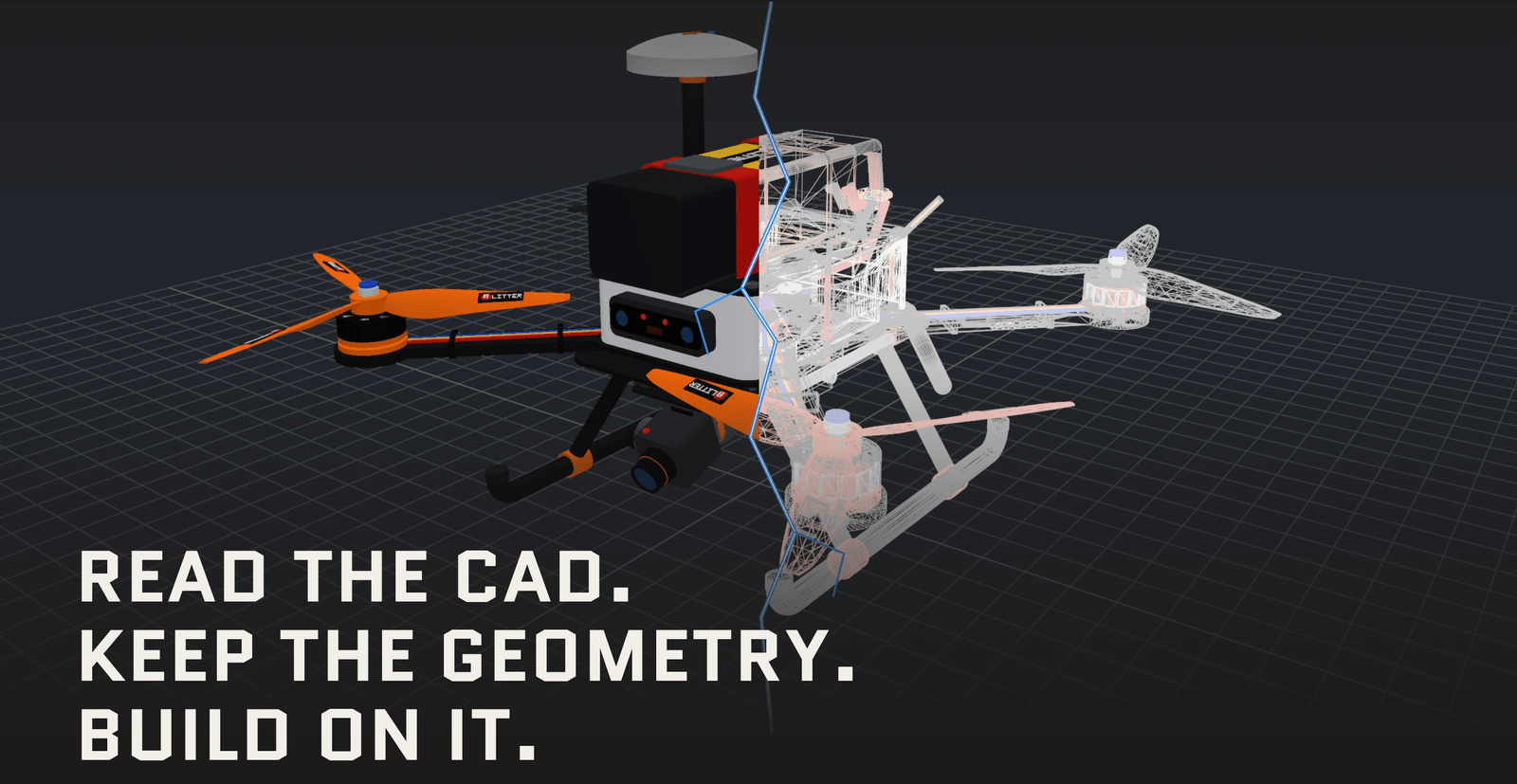
A Cadaclysm quadcopter assembly, shown as a rendered model (left) and as exact CAD geometry (right). Image courtesy of Blitter. Try the live demo.
Raytracing by Default
Raytracing is now Falcon's default mode. To support it, we're raising the base system requirement to an NVIDIA RTX 4070 Ti or higher, up from the RTX 3080 Ti.
We've also simplified Pak files: Falcon now builds only RT Pak files, which work in both RT and non-RT modes.
Finally, we recommend moving to Linux (Ubuntu 22 or 24) for the best experience, especially for teams working with world agents.
Python SDK, Tools and Editor UI
A few more updates round out the release:
- Built-in skills for AI agents are now part of the Python SDK docs, so coding agents can work with Falcon out of the box.
- EditorRunner lets you drive the Falcon Editor from scripts on Windows and Linux.
- Viewport mode indicator: the Editor UI now shows at a glance whether the viewport is editing an Unreal level or a Falcon DTES scenario.
Closing
Increasingly, we expect agents to be the primary users of the digital twin editor and simulator, freeing people to focus on simulation intent and outcomes. We can't wait to see the world agents your Editor Agents build, and how you leverage them in your physical AI and robotics work.
Read the full release notes on FalconCloud.
Got questions for the team? Get in touch.